


You already did the hard part — choosing a system. If you haven't done that yet, go back and work through the buyer's checklist and implementation roadmap first. This assumes the contract is signed and someone on your team is now staring at an empty database wondering what the first move is.
The honest truth about brewery inventory software implementation is that the software rarely fails. What fails is the data you pour into it, the process mapping you skipped, and the fact that nobody decided who owns the SKU list when packaging and the taproom disagree about what a "case" is. The rollout goes sideways in week three, everyone quietly reverts to the spreadsheet, and six months later the platform is a very expensive read-only report nobody trusts.
This is the sequence that works. Not perfectly, not on schedule every time — but reliably enough that you can actually plan around it.
Before day one: map how beer actually moves through your building
Most implementations start by importing data. That's backwards. You need to nail down the physical path your product takes before anything else, because your location model has to mirror reality or every count will be wrong.
Walk your building and write down every place inventory changes state or ownership. Not every physical spot — every state change. A typical mid-size brewery ends up with something like:
-
Cellar — bright tanks, conditioning tanks, each with a tank ID
-
Packaging — the line itself, plus a WIP holding zone for filled-but-not-labeled product
-
Finished goods cooler — palletized cans, cases, kegs staged for pickup
-
Taproom — draft lines, back-of-house keg cooler, retail cooler for to-go
-
Distribution staging — what's committed to a distributor but hasn't left
-
Co-packer — product and materials sitting at a facility you don't own
That last one trips up more teams than anything else. When you send raw beer or supply cans to a co-packer, that inventory is still yours — it's just in someone else's building. If your location model doesn't have a distinct co-packer location, you'll either double-count it or lose it entirely. Breweries have discovered hundreds of cases at a co-packer during a year-end count because the software had no place to put them.
The mistake is modeling locations around your org chart instead of around where product physically sits and who's responsible for counting it. Model the building, not the departments.
The location and SKU model: get this wrong and nothing else matters
Your SKU structure is the spine of the whole system. Breweries have a specific problem that generic inventory software wasn't built for: the same beer exists as multiple sellable units that all need to reconcile back to barrels produced.
Take control of your brewery’s workflow.
Beeryly helps you schedule batches, track inventory, and monitor sales with ease.
- Production timeline management
- Inventory tracking & alerts
- Sales & distribution monitoring
No credit card required
One IPA might be a finished 6-pack, a case of 24 loose cans, a 1/2 barrel keg, a 1/6 barrel keg, and draft pours at the taproom. If you create these as five unrelated SKUs with no shared parent, you'll never be able to answer "how much of Batch #2214 do we have left across all formats?" — which is exactly the question a recall or a lot-level traceability audit demands.
Build a parent-child structure:
| Level | Example | Why it exists |
|---|---|---|
| Product | "West Coast IPA" | Ties everything to recipe + batch |
| Package format | 6pk / 24-loose / 1/2 bbl / 1/6 bbl | Different UOMs, costs, prices |
| SKU | WCIPA-6PK-CS | The actual sellable/countable unit |
| Lot/batch | WCIPA-2214 | Traceability + freshness |
Naming convention matters more than it seems. Pick a format and enforce it before you import a single row. Product code, package, unit — always the same order. When you've got 60+ SKUs and three people creating them, inconsistent naming makes your search bar useless and your reports garbage.
One pattern worth avoiding: don't bake the price or the distributor into the SKU. Those change. The SKU should describe the physical thing only.
Converting UOMs and yield rules (the math that breaks everything)
This is where implementations stall for a week and nobody warns you upfront.
Your system needs to convert between barrels (production), gallons (tanks), cases and units (finished goods), and kegs — which come in multiple sizes. Every one of those conversions has to be defined explicitly, and you need a decision on how yield loss gets accounted for.
-
Brewhouse to bright — pull your last 8–10 batches and calculate actual average yield. Most breweries land somewhere in the 88–93% range.
-
Bright to packaged — packaging loss varies wildly by format. Canning line loss on short runs can be significant; a 10 bbl run might yield noticeably less per barrel than a 40 bbl run because of purge and startup waste.
-
Set a variance tolerance — decide what packaged-vs-expected gap triggers an investigation. A 2% variance is normal noise; a 6% gap means something's wrong or someone miscounted.
Most teams try to configure "perfect" yields on day one. Don't. Configure your best estimate, then let the first 30 days of real batches correct them. The software should help you find your true yield, not enforce a fantasy one.
Lot/batch traceability and keg tracking configuration
If you sell into distribution or you're preparing for FDA traceability requirements, lot tracking isn't optional and can't be bolted on later. It has to be configured before your first real transaction.
Decisions to lock down before you go live:
-
Lot assignment point — assign the batch/lot at the brite tank stage, before packaging, so every package format inherits it automatically. Assigning at packaging creates gaps.
-
Lot format on the can — your date/lot code on the physical package must match what the software stores. If your canning line prints a Julian date but the software stores a batch number, you can't trace a customer complaint back to anything.
-
Keg tracking granularity — decide now whether you track individual kegs (barcoded or tagged, each with its own ID) or manage them by pool count. Individual tracking is more work, but if you're losing kegs to distributors, it pays for itself quickly.
On kegs specifically: the two-way sync between "keg is out in the field" and "keg came back and got filled again" is where money leaks. A keg cycle that isn't logged looks like a lost keg, and lost kegs are dead capital. Configure keg status states clearly — empty/clean, filled, staged, shipped, at-account, returned-dirty — and make status changes a required scan, not an optional one.
The data-migration playbook
Now for the actual migration. Do not dump your entire spreadsheet history into the new system. You'll import garbage you've been carrying for years.
What to export from your current system
-
Current on-hand by SKU and location (as of a hard cutoff date and time)
-
SKU master list with your final naming convention applied
-
Supplier list with contact info and payment terms
-
Open POs and open sales orders
-
Active lots/batches still in inventory (not historical closed ones)
-
Keg count and IDs if tracking individually
The migration sequence
-
Freeze the old system at a specific date and time. Everyone stops entering transactions. Pick a slow day — Sunday works for most breweries.
-
Do a physical count at that exact freeze point. Your migration is only as good as this count. This is your ground truth.
-
Import the SKU master first, verify it, then import quantities. Never do both at once — if a SKU is misnamed you'll layer quantity errors on top of naming errors.
-
Import on-hand as adjustments, matched to your physical count, not to the old system's reported numbers. The old numbers are probably wrong; that's partly why you're switching.
-
Import open POs and orders so nothing in flight gets lost.
-
Reconcile. Every location's imported total must match your physical count sheet. Sign off location by location.
Pick a slow day like Sunday for the freeze so counting and cutover are less disruptive.
Teams that skip step 2 always regret it. Importing your old system's on-hand numbers just migrates your existing inaccuracy into a fresh, more expensive system.
Verification tests before you go live
Don't trust the import. Run these before anyone relies on the data:
-
Round-trip a batch — create a test batch, brew it on paper, package it into two formats, and confirm the UOM conversions produce the right case and keg counts.
-
Trace test — pick a lot and confirm you can list every package and location it lives in within 60 seconds. That's your recall drill.
-
Cost check — pull cost-per-unit on three SKUs and compare to what you know they cost. Way off means your UOM or yield config is wrong.
-
Keg cycle test — ship a test keg, mark it at-account, return it, refill it. Confirm the count stays right through the whole loop.
-
Negative inventory test — try to ship more than you have. The system should stop you or flag it. If it silently allows it, fix that setting before you go live.
Run all five. Not four.
The 30/60/90 breakdown
Visual roadmap:
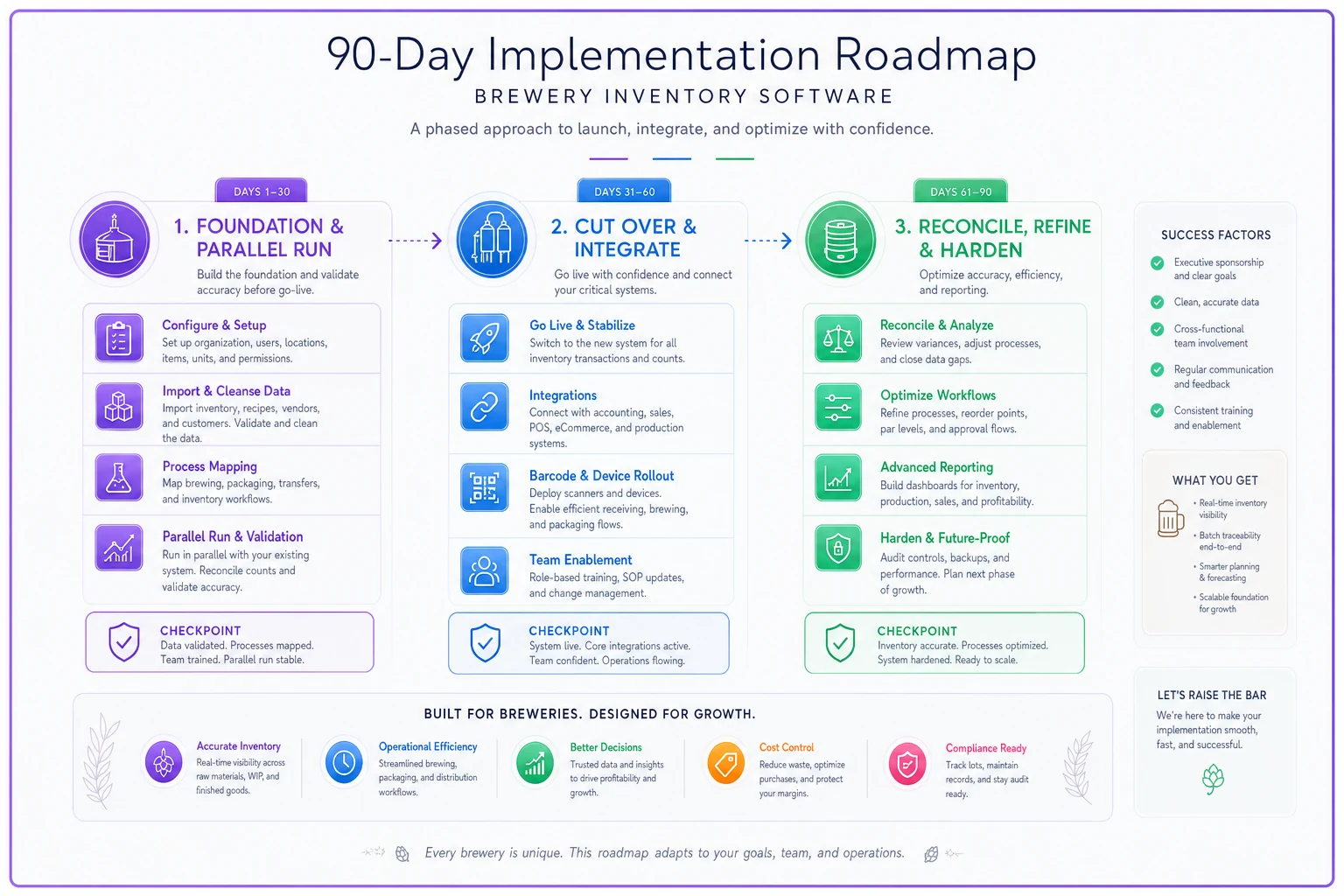
Days 1–30 — Foundation and parallel run Lock the location model, SKU structure, and UOM/yield rules. Migrate data. Run the new system in parallel with your old process — enter transactions in both. Yes, it's double work for a month. It's also the only reliable way to catch config errors before you're dependent on the system. Assign a data owner who reviews variances daily.
Days 31–60 — Cut over and integrate Kill the parallel spreadsheet. The new system is now the source of truth for on-hand. Turn on integrations one at a time — never all at once. POS first, then accounting, then shipping, then co-packer feeds. After each integration, re-run your verification tests. Update SOPs and shift handoffs so the software is baked into how work actually gets done. The handoff between cellar and packaging especially needs a mandatory "log the transfer in the system" step.
Days 61–90 — Reconcile, refine, and harden Correct your yield rules using real batch data. Run your first full physical count against the system and measure the gap — within 2–3% means you're in good shape. Start reconciling co-packer invoices against what the system says shipped. Lock down user permissions so not everyone can create SKUs or adjust inventory.
Co-packer invoice reconciliation inside the system
Co-packer billing is where the new system either pays for itself or becomes irrelevant. The reconciliation only works if your co-packer location was set up correctly at the start.
When you send materials or beer to the co-packer, it moves to that location in your system — still your inventory, different building. When they pack and ship, that gets recorded against what left. When their invoice arrives, you're comparing their claimed production and materials used against your system's record of what you sent and what should have come out.
The variance you're hunting is in materials. A co-packer billing you for 5,200 cans consumed when your yield math says the run should've used around 4,900 is a conversation worth having. Without a system holding the expected number, that overage just gets paid — month after month — and nobody notices the slow bleed.
This is one place where AI-powered operational software earns its keep. Platforms that automate the comparison between expected yield and co-packer billing can flag those variances automatically instead of relying on someone to remember to check. Not magic, just consistency that humans tend to skip when things get busy.
Vendor integration checklist
Before flipping on any integration, confirm each one:
-
POS (taproom) — Do draft pours and to-go sales decrement the right SKUs? Does a keg tapped in the taproom pull from finished goods correctly?
-
Accounting — Are COGS and inventory value syncing without creating duplicate entries? Agree on who owns the chart-of-accounts mapping before you turn this on.
-
Shipping — Do outbound shipments decrement inventory and attach lot numbers automatically? This matters for both recalls and managing shipping cost pressure.
-
Co-packer — Can you get a production and materials feed, or at minimum a structured export you can import? Manual re-keying of co-packer data defeats the purpose.
Turn these on sequentially. If you enable all four at once and inventory goes sideways, you have no idea which integration caused it.
Owner roles and acceptance criteria
Software doesn't own data — people do. Assign these before go-live:
-
SKU owner — the only person who can create or retire SKUs
-
Inventory adjustment owner — reviews and approves manual adjustments
-
Lot/traceability owner — responsible for recall-readiness drills
-
Integration owner — watches sync errors and reconciles co-packer feeds
Acceptance criteria to call the implementation done: a full physical count comes within your variance tolerance of system numbers; a recall trace runs in under a minute; co-packer invoices reconcile against system records; and the team is entering transactions in real time without falling back to spreadsheets.
Real scenario: a 12,000 bbl production brewery
A production brewery running around 12,000 bbl a year — selling in cans, half barrels, and sixtels through a distributor plus a taproom — went live over a full quarter. Their biggest pre-implementation problem was co-packer reconciliation. They'd stopped checking invoices closely because the spreadsheet couldn't keep up, and they knew they were probably overpaying but couldn't prove it.
After configuring the co-packer location and yield rules, the first three months of reconciliation surfaced a recurring materials overage on canning runs. Not dramatic per run — a few hundred cans here and there — but across the quarter it added up to a credit conversation worth a few thousand dollars. And more importantly, the overages stopped once the co-packer knew someone was actually watching the numbers.
The other win was quieter. Their year-end physical count, which used to take two days of arguing over discrepancies, came in within about 3% of the system on the first try. Not perfect. But close enough to trust, which is the whole point.
Where this goes wrong, and who shouldn't rush it
This full rollout makes sense if you're running multiple package formats, using a co-packer, or selling into distribution where traceability isn't optional. If you're a small taproom-only brewery selling everything you make out the front door, a lighter setup is fine — you don't need a distribution-grade lot system to track beer that never leaves the building.
The teams that fail almost always fail the same way: they skip the parallel run to save a month, cut over on incomplete data, hit their first bad count, lose confidence in the system, and drift back to spreadsheets. The extra weeks of double-entry feel painful in the moment. They're cheaper than running a system nobody trusts.
Get the location model and SKU structure right, count carefully at cutover, and let real batch data correct your yields over the first 90 days. The software is just plumbing. What makes it work is deciding — before you turn it on — exactly how your beer moves, who owns the numbers, and what "correct" actually looks like.
Ready to elevate your brewery operations?
Join 500+ craft breweries using Beeryly to increase production efficiency, reduce waste, and grow sales.


