


Most brewery inventory projects don't fail on the software. They fail on scope. A head brewer wants lot traceability, the taproom manager wants POS sync, the controller wants batch costing, and three weeks in, nobody agrees on what a "SKU" even means. By the time the vendor is onboard, the spreadsheet that ran the brewery for six years is still running it — just with a $900/month subscription sitting on top doing nothing.
This guide is built to prevent that. It's structured the way a buying decision actually moves — scope first, then features, then the uncomfortable vendor questions, then the data and the money, then a day-by-day rollout that won't stall your packaging line. Copy the templates, skip the parts that don't apply, keep the whole thing tight.
1. The 10-Minute Scoping Exercise (Do This Before Any Demo)
Walking into vendor calls without a scoped profile means every demo looks impressive and none of them tell you what you actually need. Answer these before you book a single call.
Size and volume
-
Annual barrelage (last 12 months, actual not planned)
-
Number of active SKUs (count package configs separately — a beer in 4-pack 16oz, 1/6 bbl keg, and 1/2 bbl keg is three SKUs for inventory purposes)
-
Number of fermentation/brite tanks and typical turns per month
Channels
-
Taproom only, self-distribution, distributor, DTC shipping, or some mix?
-
Rough % split across those channels (even a gut estimate helps)
Co-packing
-
Do you co-pack for others, get co-packed, or both?
-
Does someone else's inventory live in your warehouse? (This breaks a lot of simple systems.)
Keg program
-
Own your kegs, lease, or mixed fleet?
-
Do you charge deposits? Track serial/asset tags or just count?
A typical example: a 4,500 bbl brewery, 60% self-distribution and 40% taproom, 22 active SKUs, 14 tanks, owns around 1,200 kegs with deposits, and co-packs a seltzer brand two days a month. That profile instantly rules out the lightweight taproom-first tools and the heavy ERP suites. You've narrowed the field before anyone emails you a quote.
2. Ten Brewery-Specific Must-Have Features
Generic inventory software tracks "items in" and "items out." Breweries need features that most SMB tools simply don't have. These ten are the ones that separate real brewery inventory software from a dressed-up warehouse app.
Take control of your brewery’s workflow.
Beeryly helps you schedule batches, track inventory, and monitor sales with ease.
- Production timeline management
- Inventory tracking & alerts
- Sales & distribution monitoring
No credit card required
-
Keg/serial tracking + deposit liability. Not just "we have 340 half-barrels." The system should track individual kegs (or at least batches of serial-tagged assets), know which customer has them, and carry the deposit as a liability that clears on return. If a tool can't show you outstanding deposit dollars by account, it will cost you real money every year.
-
Tank and fermentation lot tracking. Each tank needs a live lot with volume, gravity readings, and a link to the recipe batch. When you knock out, the system splits that lot into package lots. Without this, your traceability chain snaps at the most important point.
-
Expiry and shelf-life management. Fresh code dates, "best by," and FIFO enforcement. The system should flag aging inventory before a distributor rejects it, not after.
-
POS/taproom sync. Taproom sales should decrement finished goods automatically. Manual nightly reconciliation between POS and inventory is where accuracy quietly dies.
-
Co-packer and AP integration. If you co-pack or get co-packed, you need the system to handle third-party inventory separately and reconcile against co-packer runs and invoices.
-
Mobile receiving and packing. Cellar and warehouse staff aren't going back to a desktop. Barcode/QR scanning on a phone or tablet for receiving raw materials and logging packaging runs is non-negotiable for accuracy.
-
Lot traceability (full chain). Raw material lot → brew batch → tank lot → package lot → shipment. One-click "where did this lot go" and "what went into this lot." This is also your recall backbone — see our lot-level tracking and recall-readiness work for the FDA Food Traceability Rule context if traceability is a compliance driver for you.
-
Batch costing. Actual cost per batch rolling up grain, hops, yeast, packaging, and ideally labor/overhead. This feeds your per-SKU margins.
-
BI, reporting, and audit trail. Every inventory adjustment should be logged with who, when, and why. You want days-on-hand, shrinkage, and fill-rate reports out of the box.
-
User roles and approvals. The taproom lead shouldn't be able to write off 40 cases. Approval gates on adjustments and write-offs above a threshold matter.
The mistake people make here: chasing a long feature list instead of depth on the five that actually match their profile. A taproom-heavy brewery that forces a distribution-grade keg system onto their staff ends up with features nobody uses and a worse adoption rate than a spreadsheet.
3. Twelve Vendor Questions That Surface Hidden Costs and Integration Gaps
Demos are designed to show strengths. These questions are designed to expose what vendors don't volunteer. Ask them on the call and get the answers in writing.
-
What's the all-in first-year cost including setup, data migration, and training? (Not the per-seat sticker.)
-
Is there a fee per integration? Many vendors charge separately for the POS connector or the accounting sync.
-
How does your POS integration actually work — real-time, hourly, or nightly batch? Batch means you're reconciling manually on busy nights.
-
Does deposit tracking generate an actual liability entry that syncs to accounting, or is it just a count?
-
Can I track third-party co-pack inventory separately from my own? Ask them to show it, not describe it.
-
What happens to my historical lot data during migration — does it come in, or do I start from zero?
-
How many breweries my size are live on this today, and can I talk to two of them?
-
What's the contract length and the cancellation/export terms? Can you export your full data if you leave?
-
Who does the data migration — you, us, or a paid third party? Get the hours estimate.
-
How are software updates handled, and have updates ever broken an integration?
-
What's your support SLA during production hours? A packaging-day outage with no fast support is a real problem.
-
What does it cost to add a second location or a packaging line later? Scaling pricing is where surprise bills live.
Vendors who answer integration and migration questions vaguely are usually the ones whose implementations run long. Specificity in the sales call tends to predict specificity in the rollout — not always, but often enough to pay attention to.
4. Data Model Map — What You Actually Have to Migrate
This is where projects bog down. You can't migrate what you haven't defined. Before migration, build a clean master for each of these objects. Here's a copy-and-paste CSV schema for the three that cause the most trouble.
SKU / finished goods master (skus.csv)
skuid,beername,packagetype,packageconfig,unitspercase,abv,codedatedays,shelflifedays,active SKU-1001,Harbor IPA,can,16oz 4pk,24,6.8,120,120,Y SKU-1002,Harbor IPA,keg,1/2 bbl,1,,90,90,Y SKU-1003,Harbor IPA,keg,1/6 bbl,1,,90,90,Y
Keg assets (kegs.csv)
kegid,size,assettag,ownership,depositamount,status,currentlocation,currentaccount KG-00412,1/2 bbl,ASSET-00412,owned,30.00,atcustomer,,Downtown Tap Co KG-00413,1/6 bbl,ASSET-00413,owned,15.00,incellar,Cellar-A, KG-00414,1/2 bbl,ASSET-00414,leased,30.00,emptyreturn,Warehouse,
Supplier / lead-time master (suppliers.csv)
supplierid,suppliername,materialtype,typicalleaddays,minorderqty,unit SUP-01,Yakima Hops Co,hops,21,10,lb SUP-02,Regional Malt,basemalt,7,2000,lb SUP-03,Yeast Labs,yeast,5,1,pitch
Beyond these, make sure you've mapped: tank IDs (with capacity and current lot), lot numbers (raw and finished, with your numbering convention locked down), and deposit status per keg.
One hard-won rule: freeze your SKU naming convention before migration, not during.
If your records are scattered across spreadsheets and nobody owns them, fix the data model before you buy software. A system built on messy data just produces faster messy data.
5. Total Cost of Ownership — The Buckets Nobody Quotes You
The subscription is usually the smallest number. Here's how the real cost breaks down for a small-to-mid brewery.
| TCO bucket | What it covers | Rough annual range |
|---|---|---|
| Software subscription | Per-seat or tiered platform fee | $4,000 – $18,000 |
| One-time setup / onboarding | Config, account setup | $1,000 – $6,000 (one-time) |
| Data migration | Cleaning + loading your masters | $0 – $5,000 (one-time) |
| Integrations | POS, accounting, label printers | $500 – $4,000 (sometimes per connector) |
| Hardware | Scanners, tablets, label printers | $800 – $4,000 (one-time) |
| Training & internal time | Staff hours during rollout | Often the biggest hidden cost |
| Ongoing support tier | Premium/priority support | $0 – $3,000 |
The bucket breweries chronically underestimate is internal time. A proper rollout pulls your production manager and controller away from their day jobs for chunks of 8–12 weeks. If you don't budget for that, you either rush the rollout and get bad data, or let it drag and lose momentum entirely. Price your own people's hours into the decision.
6. The 30/60/90-Day Implementation Checklist
This is the part that protects production. The goal is to roll out in parallel with operations, never on top of them. Before getting into the task-by-task breakdown, it helps to understand how the three phases relate — the first month is foundation and data cleanup, the second is integration testing and parallel running, and the third is cutover and stabilization. Assign a name to every line. "The team" owns nothing.
The sequence matters. Teams that skip straight to integrations without clean data spend the parallel-run period fighting data errors instead of validating workflows. Do the phases in order.
> Implementation flow: Data cleanup & master build → Sandbox load & spot check → Integration connections → Parallel run (2+ weeks) → Go/no-go gate → Cutover → Month-end reconciliation → Day-90 KPI review
Here's a simple visual of the implementation flow.
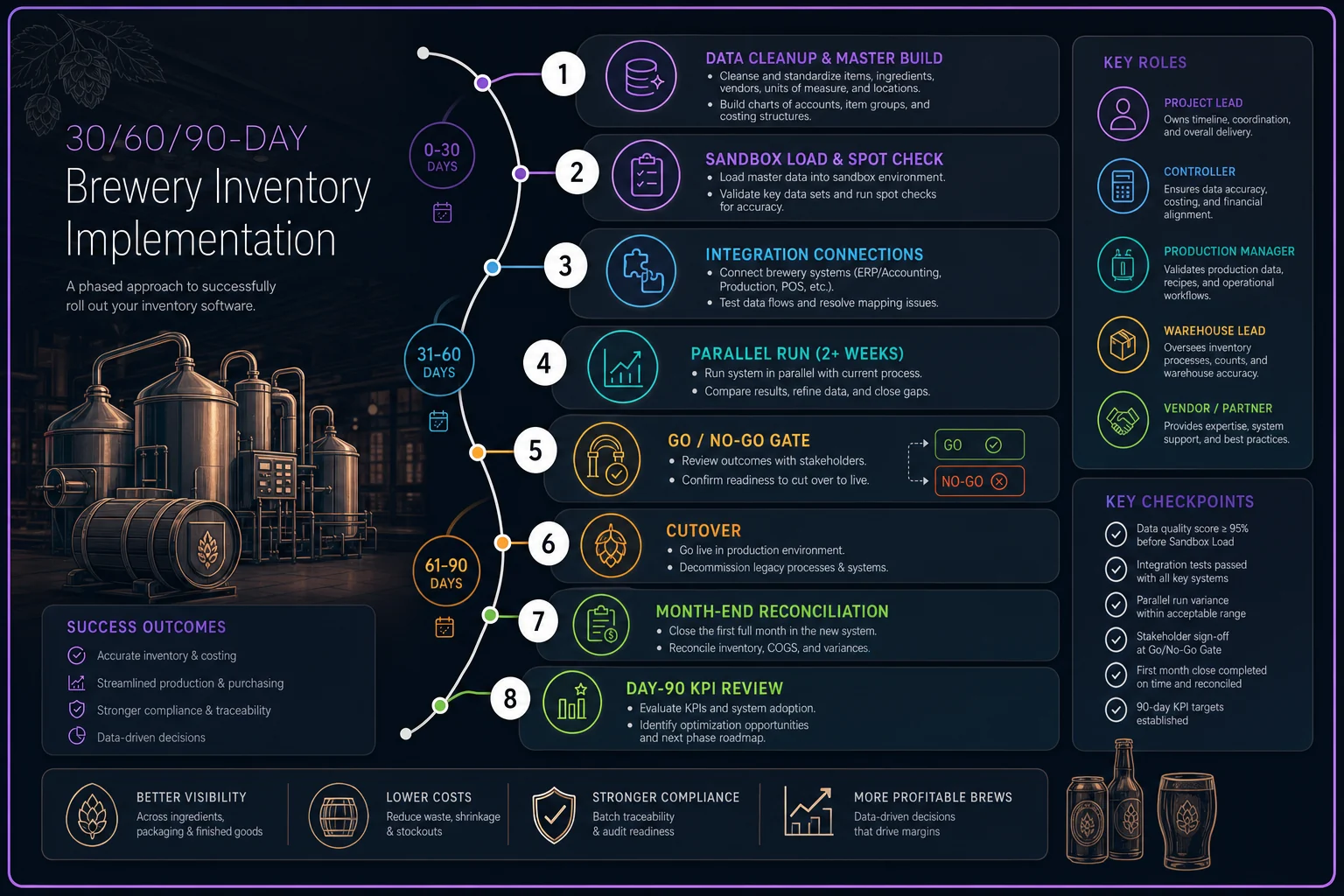
Days 0–30: Foundation and data
-
[ ] Owner
Project lead
— Finalize scoped profile and signed contract -
[ ] Owner
Controller
— Lock SKU naming convention and freeze new SKU creation -
[ ] Owner
Production manager
— Export and clean tank, lot, and batch masters -
[ ] Owner
Warehouse lead
— Build keg asset list with deposit amounts -
[ ] Owner
Vendor
— Deliver sandbox/test environment -
[ ] Owner
Project lead
— Load clean masters into sandbox and spot-check 20 records
Days 31–60: Integrations and parallel testing
-
[ ] Owner
Controller
— Connect and validate accounting sync -
[ ] Owner
Taproom manager
— Connect POS; run a test day comparing POS decrements to system -
[ ] Owner
Warehouse lead
— Test mobile receiving and packing scans on real inbound shipments -
[ ] Owner
Project lead
— Run test scripts (below) and log every failure -
[ ] Owner
All leads
— Run the system in parallel with the spreadsheet for 2+ weeks
Days 61–90: Cutover and stabilize
-
[ ] Owner
Project lead
— Go/no-go gate review (criteria below) -
[ ] Owner
All leads
— Cut over; retire the spreadsheet as system of record -
[ ] Owner
Controller
— Reconcile first month-end inside the new system -
[ ] Owner
Project lead
— Review KPIs and open issues at day 90
Sample test script (copy this):
-
TEST
Keg out to distributor, then return
-
1. Fill KG-00412 with lot HAR-2411 → status = full, in_cellar
-
2. Ship to Downtown Tap Co → status = at_customer, deposit liability +$30
-
3. Receive empty return → status = empty_return, deposit cleared -$30
-
PASS IF
keg location, lot link, and deposit balance all correct
Acceptance criteria example: POS-to-inventory variance under 2% on the test day; 100% of test kegs traceable end-to-end; month-end reconciliation completes without manual spreadsheet patching.
Go/no-go gate: Do NOT cut over if the parallel run shows recurring variance you can't explain, or if more than a couple of critical test scripts are still failing. A delayed cutover costs far less than a cutover that corrupts your finished-goods counts heading into a busy season. If you're timing this near a demand spike, read our 90/30/7 planning system for seasonal demand and taproom events before you pick a go-live date.
7. KPIs That Tell You the Project Actually Worked
Buying the software isn't success. These are the numbers that prove it earned its keep. Baseline them before cutover so you have something to compare against.
-
Inventory accuracy — physical count vs. system, target 97%+
-
Shrinkage — unexplained losses as % of production; watch it trend down
-
Days-on-hand — by raw material and finished goods; spot both overstock and risk
-
Stockouts — count of times you couldn't fill because of missing material or finished goods
-
Fill-rate — % of distributor/taproom orders filled complete and on time
-
Outstanding keg deposits — total dollars in the field (this one surprises people more often than it should)
Realistic expectation: accuracy climbs fastest, usually within the first 60 days of real use. Shrinkage and days-on-hand improvements take a quarter or two as habits settle. If you're three months in and accuracy hasn't moved, the problem is adoption, not the tool.
8. Red Flags and Negotiation Levers
Red flags to walk away from:
-
"Keg deposits are on the roadmap" — roadmap means not now
-
No existing breweries your size as references
-
Export/data portability is gated or vague
-
POS integration is "nightly batch only" for a busy taproom
-
The quote conveniently omits migration and integration fees
Negotiation levers that actually work:
-
Bundle migration into the deal. Vendors often waive it to close.
-
Lock multi-year pricing against mid-contract increases.
-
Negotiate a longer trial or paid pilot that converts.
-
Tie payment to go-live, not to signature. If implementation drags, you're not paying full freight for a system you can't use.
-
Ask for free seats during the overlap period so you're not double-paying while running parallel.
Vendors are most flexible in the last week of their sales quarter and least flexible after you've signed. Get your concessions in writing before the contract, because "we'll take care of that later" rarely survives onboarding.
9. Real Scenario + A Lightweight Pilot Plan
The scenario. A roughly 3,800 bbl brewery, self-distributing with a busy taproom and around 1,100 owned kegs, ran everything on two spreadsheets and the POS. Their recurring pain: physical counts drifted 8–12% from the spreadsheet, and they had no reliable number for outstanding keg deposits — their best guess was "somewhere around $15k, maybe more." Distributor rejections from aged inventory were happening a few times a quarter.
They scoped tight (self-distribution and keg deposits were the priorities), picked a mid-tier brewery inventory platform, and ran a 6-week pilot on one product line and the keg fleet before committing fully. By the end of the first quarter live, physical-to-system variance was sitting around 3%, and they'd found roughly $9k in deposits that were never getting billed back — kegs marked returned that never actually came home. The aged-inventory rejections dropped off because FIFO flags caught the old code dates before a distributor saw them.
The lightweight pilot plan — start here, not with a full cutover:
-
1. Pick one scope slice — your top-selling product line plus the keg fleet. Not everything.
-
2. Load only that slice into the sandbox with clean data.
-
3. Run it in parallel with your current spreadsheet for 4–6 weeks.
-
4. Scan real inbound and real packaging runs so staff hit the actual friction.
-
5. Compare pilot numbers to your spreadsheet weekly and log every discrepancy.
-
6. Decide at week 6 expand to full catalog, or walk away having spent little.
A pilot like this costs a fraction of a full rollout and tells you more than any demo ever will. It also builds internal confidence — when your packaging lead has already been scanning for six weeks, full cutover stops feeling like a risk.
The breweries that get this right treat software selection as an operations project, not an IT purchase. They scope before they shop, clean their data before they migrate, test in parallel before they cut over, and hold a real go/no-go gate instead of just hoping. The platform matters less than the discipline around it.
If you're weighing a bigger operational investment alongside this — adding tanks, a packaging line, or a second site — line the software timeline up with that planning so you're not implementing two major changes at once. Our operational readiness checklist for adding tanks or a packaging line pairs well with this guide, and if peak-season logistics are part of your calculus, the 2026 USPS surcharge tactics for craft breweries are worth a read before you commit to a go-live date.
Start with the 10-minute scoping exercise. Everything else gets easier once you know exactly what you're buying and why.
Ready to elevate your brewery operations?
Join 500+ craft breweries using Beeryly to increase production efficiency, reduce waste, and grow sales.


