


Most small breweries don't fail at preventive maintenance because they don't believe in it. They fail because the program lives in someone's head, or in a 40-page PDF nobody opens, or in a maintenance software subscription that got abandoned after the second month because nobody had time to configure it.
The fix isn't a better philosophy. It's a stack of templates simple enough that a cellar operator can run on a clipboard between tank transfers, plus worked examples so you're not guessing at the math. If you want the broader reliability thinking behind all of this, the preventive maintenance and reliability framework for small breweries covers the strategy — this article is the build-it-today companion.
Everything below is designed to copy into a Google Sheet or print as a one-pager. Structure, formulas, sample rows, and decisions — enough to deploy before close of business.
Start with the weekly operator checklist (the piece that actually gets used)
The glossy monthly inspection schedule is not what saves your glycol pump. The boring weekly walk-around is. Operators are already near the equipment every day. The checklist just makes them look in a structured way and gives them a clean path to escalate when something's off.
The mistake that keeps showing up: checklists written by someone who doesn't run the floor. Items like "inspect motor for wear" mean nothing to a busy operator at 6am. A usable checklist has a pass/fail criterion on every single line, so there's no judgment call required.
Here's a weekly operator checklist that fits on one page. Every item has a measurable pass condition and a clear escalation trigger.
| # | Check | Pass criteria | Fail → Action |
|---|---|---|---|
| 1 | Glycol chiller suction/discharge pressure | Within gauge green band (e.g. 20–40 psi suction) | Log reading, tag, notify maintenance lead |
| 2 | Glycol reservoir level | Above MIN line | Top off; if dropped >10% in a week, open work order |
| 3 | Compressor/air system pressure | Holds 100–120 psi, recovers in <90 sec | Below range → work order |
| 4 | Pump seals (brewhouse + transfer) | No visible drip, no squeal | Any weep → tag, schedule seal replacement |
| 5 | CIP pump flow/pressure | Reaches normal CIP pressure within 30 sec | Low → check strainer, then work order |
| 6 | Belt tension / drive guards | No slack, no fraying, guards in place | Fail → stop use, work order |
| 7 | Keg washer cycle completion | Full cycle, no fault code | Fault → log code, notify lead |
| 8 | Packaging line sensors/eyes | No false stops in last 3 runs | Repeated stops → work order |
| 9 | Floor drains / trip hazards near equipment | Clear, draining | Clear immediately |
| 10 | CO2 lines & regulators | No audible leak, gauges steady | Leak → shut off, escalate immediately |
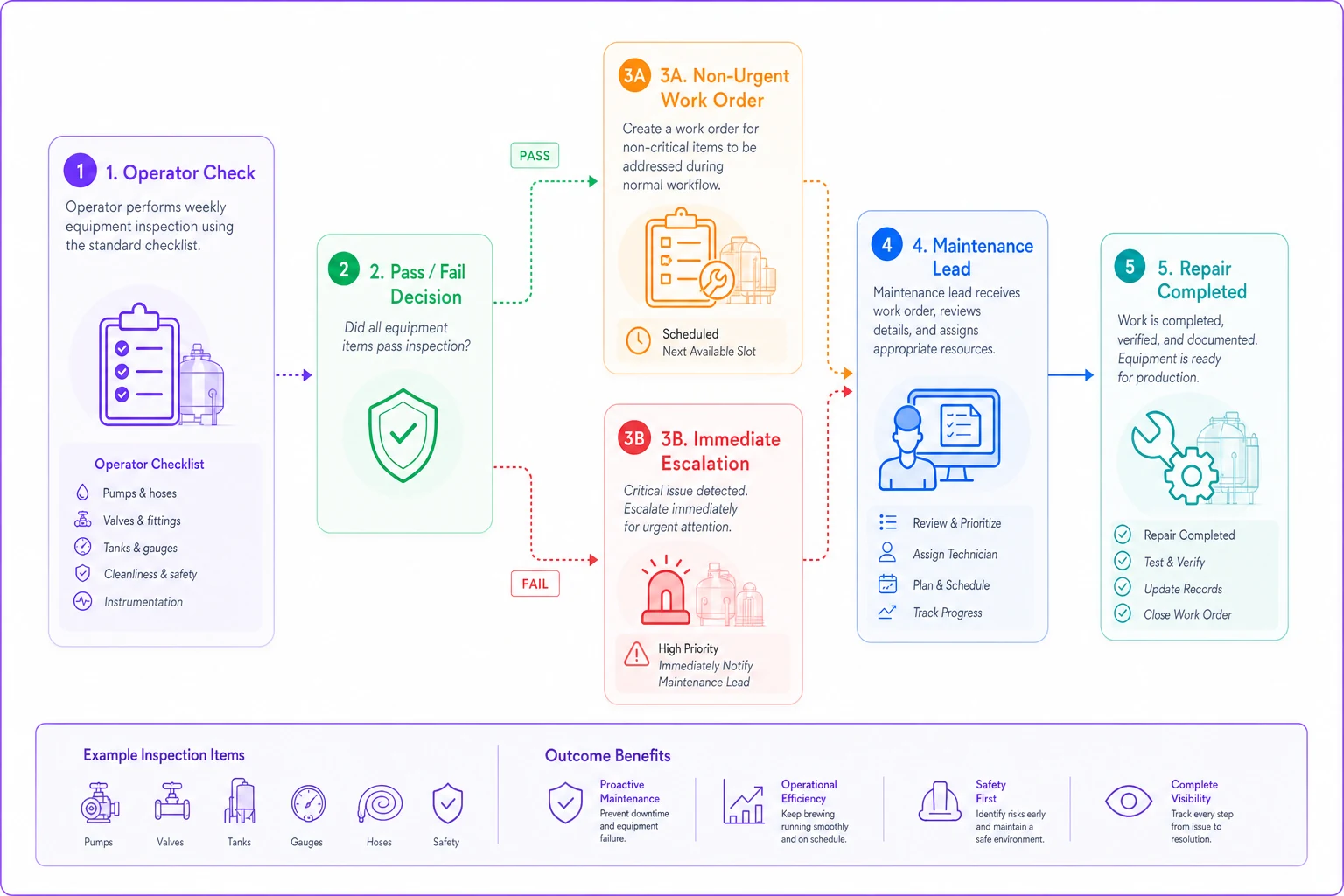
A simple workflow diagram helps operators and leads see exactly what happens after a fail: tick/fail → tag → work order → repair. Keep it visible on the clipboard.
-
Pass → tick box, move on.
-
Fail, non-urgent → write a work order, tag the asset, tell the maintenance lead by end of shift.
-
Fail, production-stopping → stop the affected equipment, notify maintenance lead + production manager now.
-
Safety (CO2, electrical, pressure) → shut it down, clear the area, call the lead immediately regardless of time.
When operators have a crisp fail action, they report problems. When the checklist just says "inspect," small issues go unlogged until they become 2am failures. The pass/fail language is doing the real work here, not the list of items.
The one-page MTTR / MTBF failure log (with a 3-month worked example)
You don't need reliability software to track whether your equipment is getting better or worse. You need one sheet where every failure gets a row, and two formulas at the bottom.
Take control of your brewery’s workflow.
Beeryly helps you schedule batches, track inventory, and monitor sales with ease.
- Production timeline management
- Inventory tracking & alerts
- Sales & distribution monitoring
No credit card required
| Column | What goes in it |
|---|---|
| Date | Failure date |
| Asset | e.g. Glycol Chiller #1 |
| Failure description | "Low suction pressure, compressor short-cycling" |
| Time down (start) | When it stopped working |
| Time restored | When it was back in service |
| Downtime (hrs) | =Time restored − Time down (start) |
| Repair action | What fixed it |
| Parts used | Linked to spare-parts register |
-
MTTR (Mean Time To Repair) = total downtime hours ÷ number of failures In a sheet:
=SUM(DowntimeColumn) / COUNT(DowntimeColumn) -
MTBF (Mean Time Between Failures) = total operating hours in period ÷ number of failures In a sheet:
=(OperatingHoursInPeriod) / COUNT(DowntimeColumn)
For operating hours, pick a convention and stick with it. Most small breweries treat the chiller or compressor as running more or less continuously, so a quarter is roughly 90 days × 24 hrs ≈ 2,160 hours. If a piece of equipment only runs during shifts, use shift hours instead — something like 10 hrs/day × 5 days × 13 weeks ≈ 650 hours.
Worked 3-month example — Glycol Chiller #1
| Date | Failure | Downtime (hrs) |
|---|---|---|
| Jan 14 | Low refrigerant / short-cycling | 3.5 |
| Feb 09 | Contactor failure | 1.0 |
| Mar 22 | Pump seal leak on glycol loop | 4.5 |
-
Failures in quarter
3
-
Total downtime
3.5 + 1.0 + 4.5 = 9.0 hrs
-
MTTR = 9.0 ÷ 3 = 3.0 hrs per failure
-
Operating hours (continuous, ~90 days)
≈ 2,160 hrs
-
MTBF = 2,160 ÷ 3 = 720 hrs between failures (roughly one failure every 30 days)
A single quarter's MTTR/MTBF number is nearly meaningless on its own. The value is in the trend. If next quarter MTBF climbs from 720 to 1,100 hrs, your PM is working. If MTTR climbs from 3.0 to 5.0 hrs, that's usually a parts availability problem, not a repair-skill problem — you were waiting on something to arrive. Which is exactly why the next template matters.
Minimal spare-parts register (so a repair isn't a parts hunt)
The gap between a 1-hour repair and a 2-day outage is almost never the wrench time. It's whether the seal, contactor, or belt was on a shelf or on a truck from a supplier three states away.
A minimal register has just enough columns to make reorder and location obvious. Don't over-build this.
| Part # | Description | Fits asset | Location (bin) | Qty on hand | Min (ROP) | Lead time (days) | Unit cost | Criticality |
|---|---|---|---|---|---|---|---|---|
| GLY-SEAL-01 | Mechanical seal, glycol pump | Glycol loop pumps | A-03 | 2 | 2 | 10 | $85 | High |
| CMP-CONT-01 | Compressor contactor | Chiller #1/#2 | A-05 | 1 | 1 | 7 | $120 | High |
| BELT-PKG-04 | Drive belt, filler | Packaging line | B-02 | 1 | 1 | 5 | $40 | High |
| CIP-STR-02 | CIP pump strainer screen | CIP skid | B-07 | 3 | 1 | 14 | $22 | Medium |
| KW-NOZ-03 | Keg washer spray nozzle | Keg washer | C-01 | 4 | 2 | 21 | $15 | Medium |
Two things people consistently get wrong. First, they skip the "fits asset" column, and then nobody can find the right seal under pressure. Second, they list every part the equipment contains — you don't need the full BOM. You need the parts that fail and stop production. For most small breweries that's somewhere between 15 and 30 line items, not 300.
Reorder point (ROP) — the actual calculation, with numbers
The min column above isn't a guess. There's a simple formula, and for spare parts it's cleaner than for perishable inputs because consumption is lumpy and irregular.
ROP = (average usage per day × lead time in days) + safety stock
For a spare part that fails a few times a year, average daily usage is tiny, so safety stock does most of the work. The practical version for critical spares:
ROP = expected demand during lead time + safety stock
Worked example — glycol pump seal (GLY-SEAL-01)
-
Replaced this seal 4 times last year across all glycol pumps.
-
Daily usage = 4 ÷ 365 ≈ 0.011 per day
-
Lead time = 10 days
-
Demand during lead time = 0.011 × 10 ≈ 0.11 seals
That number is basically zero, which tells you consumption-based ROP is the wrong lens for a critical, low-volume part. So you flip to a criticality rule: for any High-criticality part, keep enough on hand to cover the realistic simultaneous failure plus the lead-time risk. With two glycol pumps that could both need a seal and a 10-day lead time, you set Min = 2. When you drop to 2, reorder back to 3–4.
Contrast that with the CIP strainer screen (CIP-STR-02), which actually wears out predictably:
-
Used ~8 times/year → 8 ÷ 365 ≈ 0.022/day
-
Lead time = 14 days
-
Demand during lead time = 0.022 × 14 ≈ 0.31
-
Safety stock (round up for a cheap medium part) = 1
-
ROP ≈ 1, reorder up to 3
ROP math works well for wear parts with steady consumption, and barely applies to catastrophic-but-rare parts. For the rare-but-critical ones, criticality and lead time drive the decision — not usage rate.
Stocking-decision table: keep, consign, or JIT?
Not every part belongs on your shelf. Carrying inventory ties up cash and space; stocking nothing invites 2am disasters. The decision is a function of three variables: unit cost × lead time × criticality.
| Criticality | Lead time | Unit cost | Decision |
|---|---|---|---|
| High | Long (>7 days) | Any | Keep on shelf |
| High | Short (≤3 days) | Low–mid | Keep 1 minimum |
| High | Short (≤3 days) | Very high | Consign or JIT with guaranteed local supplier |
| Medium | Long (>14 days) | Low | Keep small qty |
| Medium | Short | Any | JIT (order when needed) |
| Low | Any | Low | JIT |
| Low | Any | High | JIT, don't stock |
As a quick decision tree in plain language:
-
Is it production-stopping (High criticality)? If no → JIT unless it's cheap enough that stocking a few doesn't matter.
-
If yes → Is the lead time longer than you can tolerate a line being down? If yes → keep it on the shelf.
-
If the part is expensive enough that shelving several hurts cash flow → ask the supplier about consignment (they own it on your shelf, you pay when you use it).
The common mistake is treating cost as the main driver. It isn't. A $40 belt that stops your filler and takes 5 days to arrive is worth stocking. A $400 part that only matters during a planned rebuild probably isn't. Criticality and lead time outrank price almost every time.
Roles & escalation matrix (including the 2am failure)
A PM program dies the first time a failure happens and nobody knows who to call. Define this once, print it, post it by the panel.
| Situation | First responder | Backup | Who gets notified |
|---|---|---|---|
| Routine checklist fail (non-urgent) | Operator logs work order | Maintenance lead | Maintenance lead by EOD |
| Production-stopping failure, business hours | Maintenance lead | Production manager | Production manager immediately |
| Safety event (CO2, pressure, electrical) | Operator shuts down, clears area | Maintenance lead | Lead + owner immediately |
| 2am / off-hours failure (e.g. chiller down, tanks at risk) | On-call maintenance lead | External service contractor | Production manager by text, owner if product at risk |
The 2am scenario deserves its own line because it's where small breweries get burned worst. A glycol chiller failing overnight with fermenting tanks is a real money event — a stuck fermentation or temperature excursion can cost you a full batch. The fix is boring but effective: one posted phone number for the on-call lead, a backup external HVAC/refrigeration contractor already vetted and saved in contacts, and a clear rule on when the owner gets woken up. If product is at risk, the answer is always.
Bin / Kanban labeling and storage SOP
The register is useless if nobody can find GLY-SEAL-01 in bin A-03 at 2am. A few things that make the storage side actually work:
-
Label bins, not just parts. Each bin gets a code (A-03, B-07) that matches the register's Location column exactly.
-
Two-bin Kanban for consumables. For wear parts used regularly — strainers, nozzles, belts — run two bins. When the front bin empties, that's the reorder signal. No counting required.
-
One card per part. A simple index card or printed tag in each bin showing part #, description, min qty, and supplier. When you pull the last one above min, the card goes in the reorder tray.
-
Store critical spares near the equipment, not in a back room. The 10 minutes you save at 2am matters more than tidy centralization.
-
Photograph the shelf layout once and tape it inside the cabinet, so a new operator isn't running a scavenger hunt.
Photograph the shelf layout once and tape it inside the cabinet, so a new operator isn't running a scavenger hunt.
Physical signals — an empty bin, a moved card — beat digital counts for small teams because they don't depend on anyone remembering to update a sheet mid-crisis.
Minimal work-order form + how long to keep records
A work order doesn't need to be fancy. It needs enough to trigger the repair, record what happened, and feed your failure log.
-
WORK ORDER #
-
Date raised / by whom
-
Asset
-
Problem description
-
Priority (Routine / Production-stopping / Safety)
-
Assigned to
-
Date completed
-
Repair action taken
-
Parts used (part #s — copy into failure log + decrement register)
-
Downtime hours (feeds MTTR)
Retention recommendation: keep closed work orders and failure logs for at least 2 years. One year isn't enough to see seasonal failure patterns — your chiller behaves differently in July than in January. Two to three years lets you spot whether an asset is trending toward end-of-life and whether your PM frequency is actually reducing failures. If you ever face a warranty claim or an insurance question after a major equipment loss, that history is also the evidence that you maintained the asset properly.
A real scenario — what this stack changes
A production brewery doing around 4,000 bbl/year had a recurring problem: the glycol system would fail roughly once a month, and because nobody stocked the common seals and contactors, each failure turned into a day or two of waiting on parts. Two failures one summer caught them with warm fermenters and cost most of two batches.
After standing up this exact stack — weekly operator checklist, a shared failure log, and a 20-line spare-parts register with glycol seals and contactors stocked to min — things shifted over the next two quarters. Failures didn't disappear, but MTTR dropped from a day or two down to around 2–3 hours, because the part was already on the shelf and the operator had logged the warning signs on the weekly check. MTBF stretched out as the weekly top-offs and pressure checks caught slow leaks before they became hard failures. The owner's rough estimate was somewhere around $6k–$9k in avoided batch losses and emergency contractor call-outs over those two quarters — not a dramatic transformation, just fewer 2am phone calls and no more scrapped batches from a preventable chiller outage.
What made it stick wasn't sophistication. Every piece fit on a clipboard or a single sheet, and the operators owned it.
When this makes sense — and when it doesn't
This operator-first, template-driven approach is the right call when you're a small team, your maintenance "department" is one or two people wearing other hats, and your failures are concentrated in a handful of assets — chillers, pumps, compressors, packaging line. That's most breweries under around 15,000 bbl.
It's a bad fit if you've already got dedicated maintenance staff and a working CMMS with solid asset histories. In that case these one-pagers are a step backward from what you have. And if your real problem is a single piece of end-of-life equipment that fails regardless of how well you maintain it, no checklist fixes that — that's a capital decision, not a PM one.
For everyone in between, the hard part was never understanding MTTR or ROP. It was having the artifacts ready so the program survives a busy week. Copy the tables above into a sheet, print the checklist and escalation matrix, stock your five most critical spares to min, and you've got a working preventive maintenance program running today — not in a quarter.
Ready to elevate your brewery operations?
Join 500+ craft breweries using Beeryly to increase production efficiency, reduce waste, and grow sales.